Node Settings
Before You Begin
Ensure that the Communicator Basic settings, on the page, match the Node settings.
There are no Node settings for the Broadcast node, except Name.
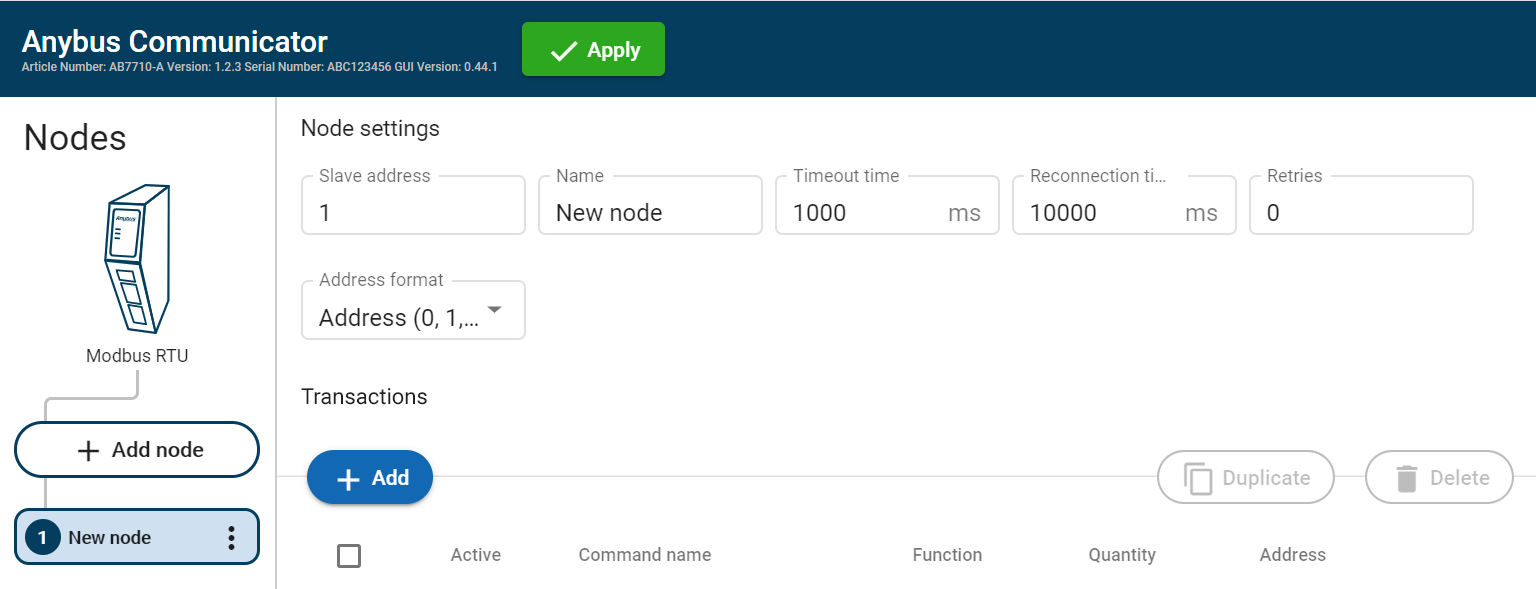 |
In the node list, select a node to configure.
Configure the Node settings.
Setting
Value
Description
Node address
1 to 247
Node ID, also called node address, is the node’s identity on the subnetwork. The node id is a number between 1 and 247. By default, the node is assigned the next available number. The same node id cannot be used on multiple nodes.
Name
N/A
By default, the node is assigned the name New node and the corresponding Server address. The node name can be changed.
Timeout time
10 ms to 10 000 ms
Default 1000 ms
If a transaction in a transaction fulfills the specified timeout time value for all specified retries, the remaining transactions defined for the node will be skipped in the current cycle.
The maximum addition to the cycle length is only one instance of the timout setting.
Specify how long the Communicator should wait before sending the message again, when no response is received from the node.
If the timeout time is exceeded, the Communicator continues to send the message until the maximum number of retries has been reached.
Reconnection time
Min 10 ms
Max 60 0000 ms
Default 1000 ms
Specify for how long the Communicator should wait before attempting to reconnect, if the node is disconnected.
The default value is 10 000 ms.
Reconnect time (10 ms) is not applicable for the broadcast node, that hold transactions destined to all nodes.
Retries
0 to 10
Default 0
Specify the number of attempts the Communicator should make, when no response is received from the node.
Address format
Default format:
Address Register
Modicon Modicon extended
Available for the Modbus TCP serial protocol.
Specify the address format for the node.
Address: 0, 1, 2, ...
Register: 1, 2, 3, ...
Modicon: 00001/10001/30001/40001
Modicon extended: 000001/100001/...
To apply the settings, click Apply in the web-interface header, and follow the instructions.
To Do Next
Add Transactions, Add Transactions.