Create Transaction Templates
All frames are verified using a CRC-16-IBM checksum.
My Drive is using a request/response protocol to access parameters addressed with index and sub index.
Map up control word, speed from EtherNet/IP to My Drive and status word and actual speed from the drive to EtherNet/IP.
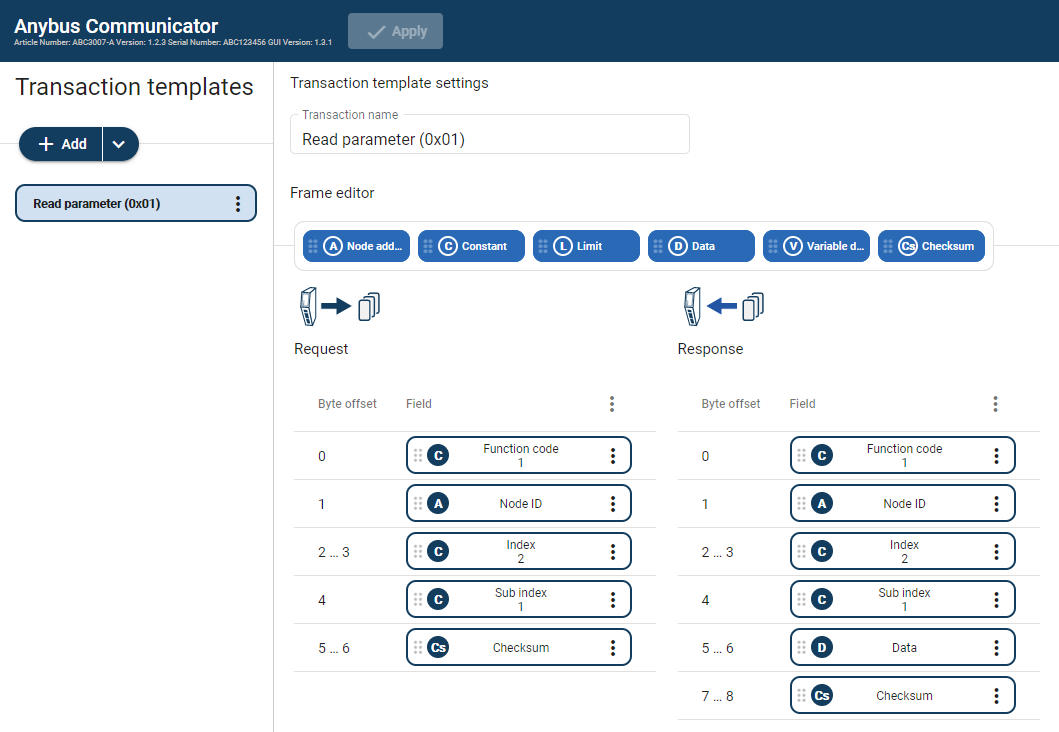
Create Read Parameter (0x01)
The Communicator reads values delivered from to the My Drive node on to the PLC.
 |
Add an Empty template and select it.
Name the template Read parameter (0x01).
In the Frame editor Request area, add five frame objects with the following settings:
Table 6. Request frame objectsFrame objects
Name
Bytes/Length
Type/Checksum type
Endianess
Fixed field
Value
Constant
Function code
1
Byte
N/A
Yes
N/A
Node address
Node ID
1
Byte
N/A
N/A
N/A
Constant
Index
2
Word (two bytes)
Big-endian
No
Min 0
Max 1000
Constant
Sub index
1
Byte
N/A
No
Min 0
Max 255
Checksum
Checksum
2
CRC
N/A
N/A
N/A
In the Frame editor Response area, add six frame objects with the following settings:
Table 7. Response frame objectsFrame object
Name
Bytes/Length
Type/Checksum type
Endianess
Fixed field
Value
Constant
Function code
1
Byte
N/A
Yes
N/A
Node address
Node ID
1
Byte
N/A
N/A
N/A
Constant
Index
2
Word (two bytes)
Big-endian
No
Min 0
Max 1000
Constant
Sub index
1
Byte
N/A
No
Min 0
Max 255
Data
Data
2
Byte
N/A
Yes
N/A
Checksum
Checksum
2
CRC
N/A
N/A
N/A
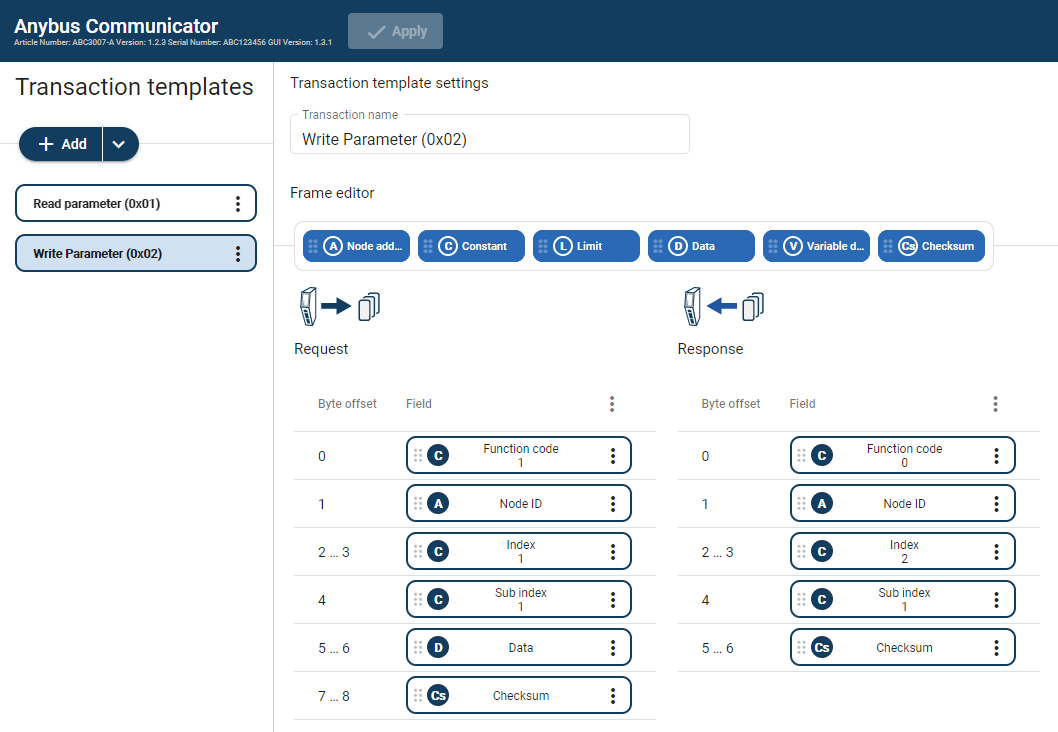
Create Write Parameter (0x02)
The Communicator writes values delivered from the PLC to the My Drive node.
 |
Add an Empty template and select it.
Name the template Write parameter (0x02).
In the Frame editor Request area, add six frame objects with the following settings:
Table 8. Request frame objectsFrame object
Name
Bytes/Length
Type/Checksum type
Endianess
Fixed field
Value (Hex)
Constant
Function code
1
Byte
N/A
Yes
N/A
Node address
Node ID
1
Byte
N/A
N/A
N/A
Constant
Index
2
Word (two bytes)
Big-endian
No
Min 0
Max 1000
Constant
Sub index
1
Byte
N/A
No
Min 0
Max 255
Data
Data
2
Byte
N/A
Yes
N/A
Checksum
Checksum
2
CRC
N/A
N/A
N/A
In the Frame editor Response area, add five frame objects with the following settings:
Table 9. Response frame objectsFrame objects
Name
Bytes
Type/Checksum type
Endianess
Fixed field
Value (Hex)
Constant
Function code
1
Byte
N/A
Yes
N/A
Node address
Node ID
1
Byte
N/A
N/A
N/A
Constant
Index
2
Word (two bytes)
N/A
No
Min 0
Max 1000
Constant
Sub index
1
Byte
N/A
No
Min 0
Max 255
Checksum
Checksum
2
CRC
N/A
N/A
N/A