Communicator Built-In Web Interface Overview
Use the Communicator built-in web interface to configure, maintain and troubleshoot the Communicator.
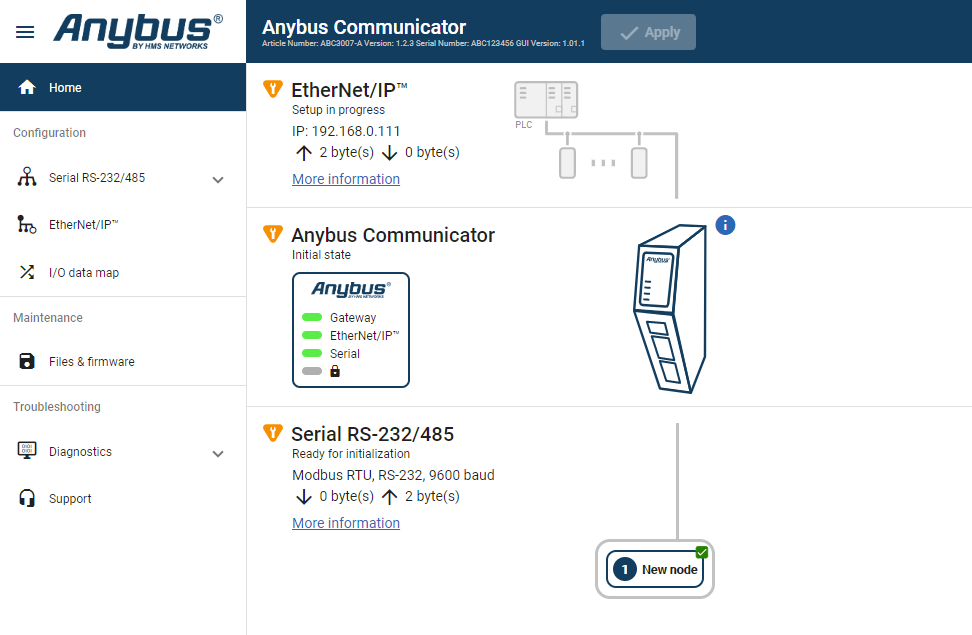 |
Menu item | Description |
|---|---|
Home | View the Communicator, network and node status. |
Apply | After configuration changes are made and verified, press Apply to make the settings take effect. |
Serial RS-232/485 | Serial Subnetwork with Nodes. Select a Serial protocol, use Modbus RTU standard transactions or create your own transaction templates. Configure communication and add nodes and commands. |
EtherNet/IP | High Level Network with Client. Configure I/O Size and IP settings. |
I/O data map | View the added commands mapped to the Communicator internal memory area. |
Files & firmware | Save settings in a configuration files, upload configuration files and upgrade firmware. |
Diagnostics | Monitor and troubleshoot the Communicator. |
Support | Contains Communicator product information, Anybus contact information, link to Anybus support website, and product file for download. Here you can generate a support package with product information, to send to your Anybus support technician. |