Configure Frame Fields Settings
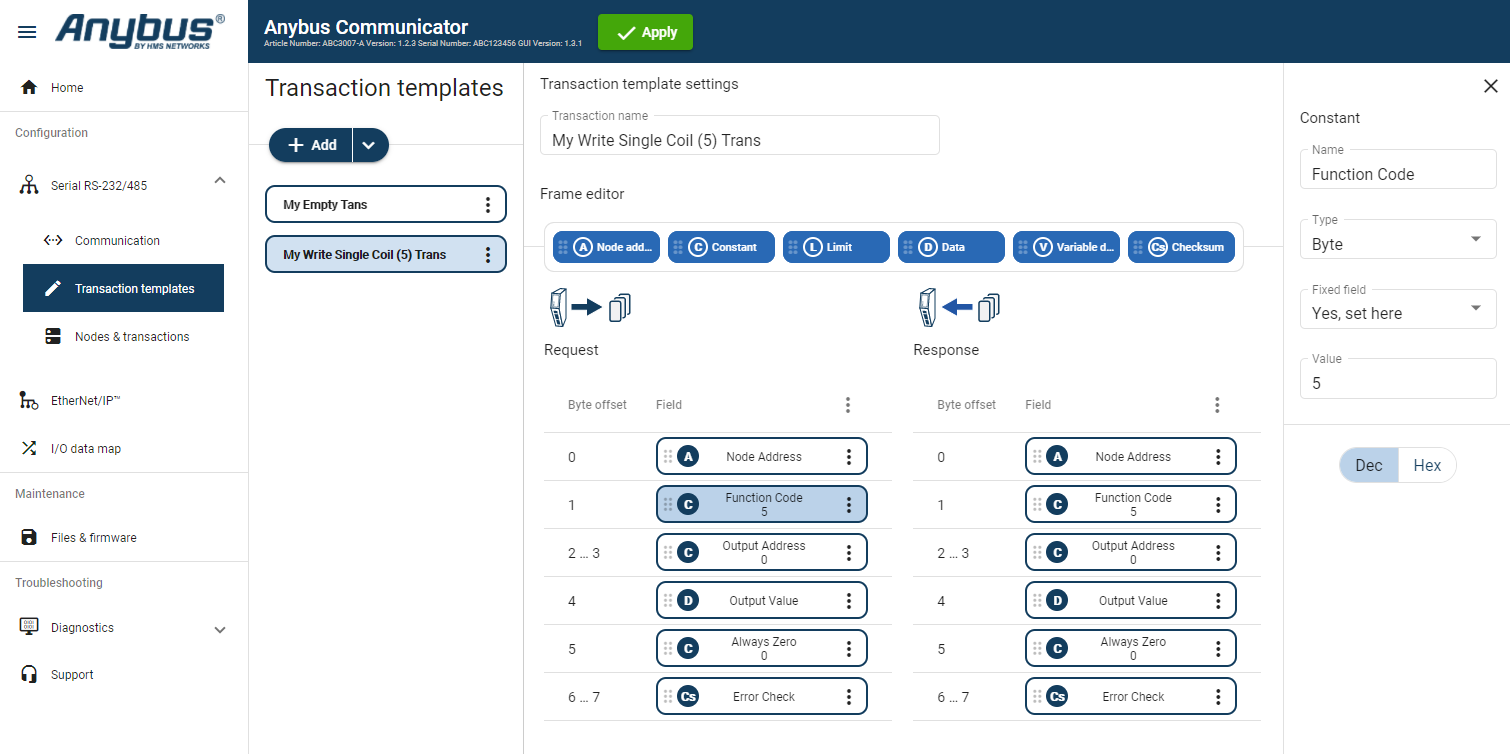 |
In the Transaction templates list, select a transaction template to configure.
In the Transaction template settings select a Field to configure.
The Field sidebar opens, on the right side of the screen.
Configure the Field settings.
Frame field representing the Node address of the node. A constant byte that holds a copy of the nodes address when the transaction is used by a node.
When the transaction template is used by a node, the Node address field will automatically be replaced with the actual node address of the node.
Name: You can name the Frame Field to make it easier to identify.
Type: Specify the number of bytes in the frame.
Select Byte (1 byte) (Default), Word (2 bytes), Double word (4 bytes), Array of bytes or String.
Endianess: Select Big-endian (Default) or Little-endian.
Fixed field*: Select Yes, set here (Default) or No, set when used.
Length: Valid for Array of bytes. Enter a byte offset value between 0 and 32 byte.
Default value is 1 byte.
Enter a Value for each Byte (0–31).
Value: The value of the Constant in the frame.
Enter a value between 0 (Default) and 255.
Min value: Specify the minimum value that can be set when the template is used.
Max value: Specify the maximum value that can be set when the template is used.
Default value: Default value set when the template is used.
Note
Limit can only be added as a Response frame field.
Name: You can name the Frame Field to make it easier to identify.
Type: Specify the number of bytes in the frame. Select Byte (1 byte) (Default), Word (2 bytes), Double word (4 bytes).
Endianess: Select Big-endian (Default) or Little-endian.
Min value: The lowest value of the limit range.
Max value: The highest value of the limit range.
Base number system: Select Decimal Dec (Default) or Hexadecimal Hex.
Name: You can name the Frame Field to make it easier to identify.
Fixed field*: Select Yes, set here (Default) or No, set when used.
Length: Enter a value between 1 (Default) and 512 bytes.
Min length: Specify the minimum length that can be set when the template is used.
Max length: Specify the maximum length that can be set when the template is used.
Default length: Specify the default length that can be set when the template is used.
Name: You can name the Frame Field to make it easier to identify.
Fixed field*: Select Yes, set here (Default) or No, set when used.
Minimum payload length: Specify the minimum payload length that can be set when the template is used.
Maximum payload length: Specify the maximum payload length that can be set when the template is used.
Default max payload length: Specify the default payload length that can be set when the template is used.
Data delimiter: Specify how to detect/define the length of the variable data of the high level network. Select Byte counter, End pattern or None (Default).
For information about End- and Length character, see Data Delimiter and Subnet Delimiter Options.
Subnet delimiter: Specify how to detect/define the length of the variable data of the serial subnetwork. Select Byte counter, End pattern or None (Default).
For information about End- and Length character, see Data Delimiter and Subnet Delimiter Options.
End pattern: Specify the value defining the end of the payload, when a delimiter is set to end pattern.
Fill padding: Fill up unused data mapped to the high level network or the general area with a field padding value.
To deactivate/activate Fill padding, click the slide toggle. When Fill padding is activated, enter a Fill padding value between 0 and 255.
Base number system: Select Decimal Dec (Default) or Hexadecimal Hex.
Name: You can name the Frame Field to make it easier to identify.
Checksum type: Specify the algorithm used to calculate the checksum. Select CRC (CRC-16-IBM) (Default), LRC (ISO 1155:1978), XOR or ADD.
Start offset: Specify the offset from where to start the checksum calculation. Enter a value between 0 (Default) and 511.
Error check type: Specify how the checksum is converted. Select None (Default), One’s complement or Select None, Two’s complement.
Representation: Specify how the checksum is represented. Select Binary (Default) or ASCII.
Yes, set here: The Value set here is fixed and cannot be changed when the transaction is used on a node.
The value must be updated in the transaction template.
No, set when used: The Default value set here can be edited when the transaction is used on a node.
The allowed range is the min/max values.
High Level Network: 1 byte(s)
Subnetwork: 1 byte(s).
Repeat step 1 to 3 until you have configured all the desired frame objects.
Apply Configuration
To apply the settings, click Apply in the web-interface header, and follow the instructions.