To Configure IP Settings Manually
Figure 63. IP Settings, DCHP disabled
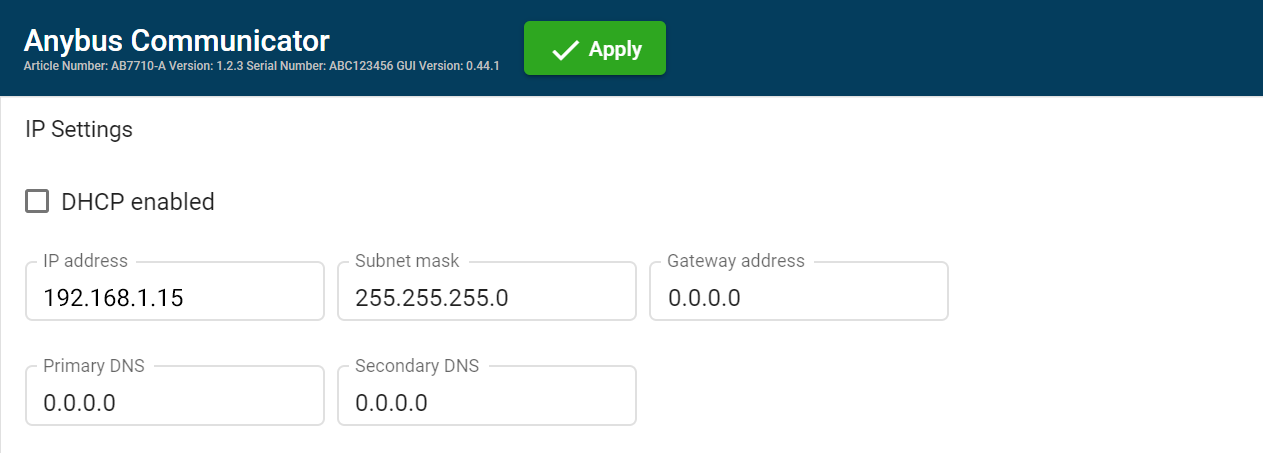 |
Deselect the DHCP enabled checkbox.
Configure the IP settings.
Setting
Description
IP address
The EtherNet/IP network IP address in IPv4 dot-decimal notation
Subnet mask
The EtherNet/IP network Subnet mask in IPv4 dot-decimal notation.
Gateway address
The EtherNet/IP network Gateway address in IPv4 dot-decimal notation.
If there is no gateway available, set the Gateway address to: 0.0.0.0
Primary DNS
The EtherNet/IP network Primary DNS in IPv4 dot-decimal notation.
Secondary DNS
The EtherNet/IP network Secondary DNS in IPv4 dot-decimal notation.
If you change a value and click Refresh, the value is reset to the last applied value.